When you need to reuse or create a new integration
This guide explains when you can reuse an existing VMS integration in Watchful and when you need to create a new one.
Overview
Integrations in Watchful are credential-based. A single integration can support multiple customers and sites, as long as the credentials used have the required access.
In most cases, you do not need to create a new integration. You only need a new one when access is missing.
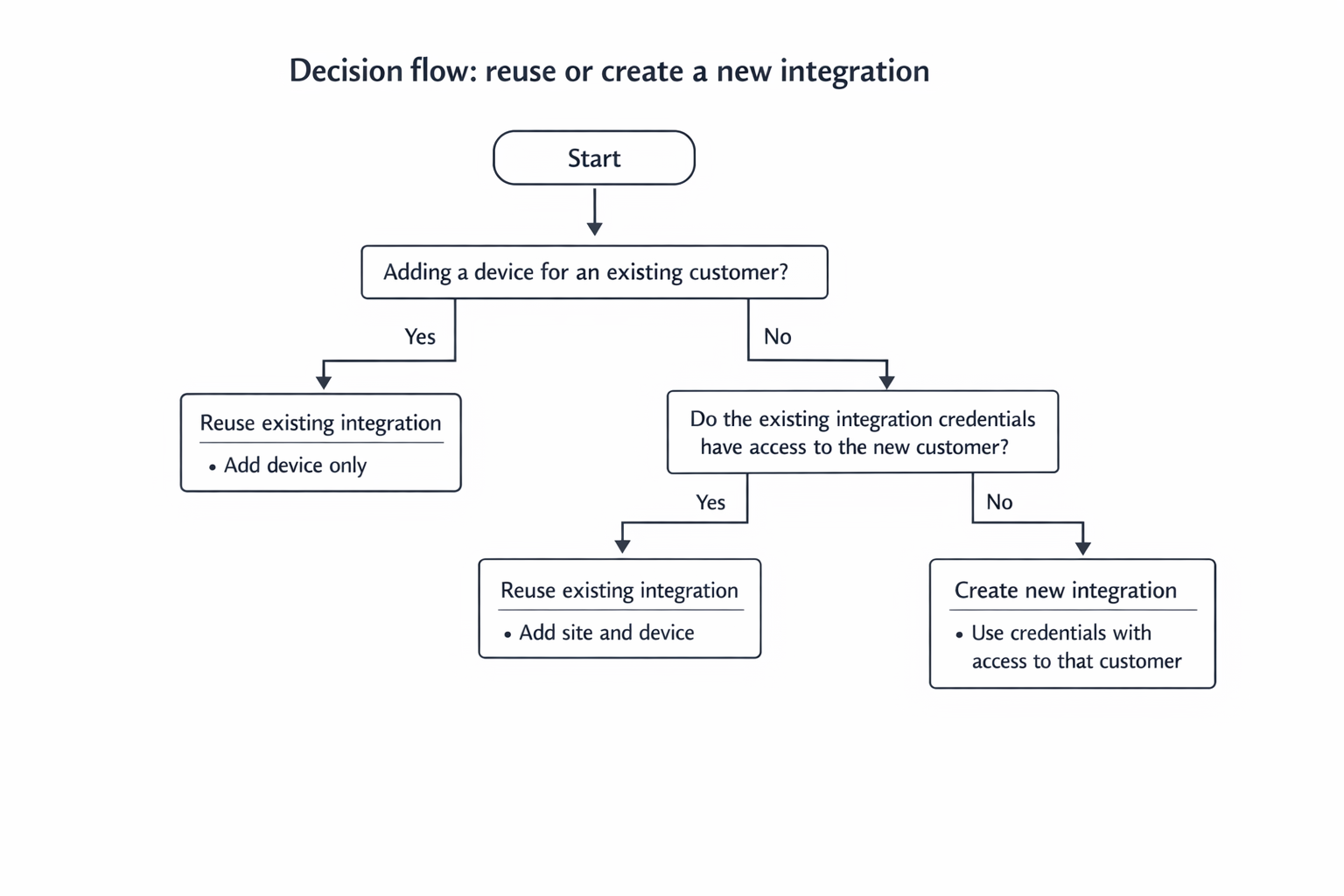
Adding multiple devices for the same customer
If you are adding more devices for the same customer, and you are using the same VMS integration:
Reuse the existing integration.
Repeat only the Add device steps for each new device.
Do not create a new integration.
This applies when:
The customer is the same.
The integration credentials already have access to the required cameras.
Why:
The integration handles authentication and permissions. Each device represents a monitored site or camera group.
Adding a new customer
When adding a new customer, whether you need a new integration depends on credential access.
Reuse the existing integration if
The credentials used to create the integration already have access to the new customer.
The new customer appears when selecting a customer or role during device setup.
Create a new integration if
The existing credentials do not have access to the new customer.
The new customer does not appear during device setup.
How to check access before creating a new integration
Go to Sites in Watchful.
Start adding a new device.
Select the existing VMS integration.
Check the Customer or Role selection:
If the new customer appears, reuse the integration.
If it does not appear, create a new integration with the correct credentials.
Check the decision flow below: